Free Try first
₹0
Explore the full interface with a sensible limit before you license batch mode.
- Access to all features
- No batch processing
- No free upgrades
- No support

Run multiple find-and-replace rules across many Word and text files - complete word, starts-with, ends-with, and case-sensitive options - with clear reports when you are done.
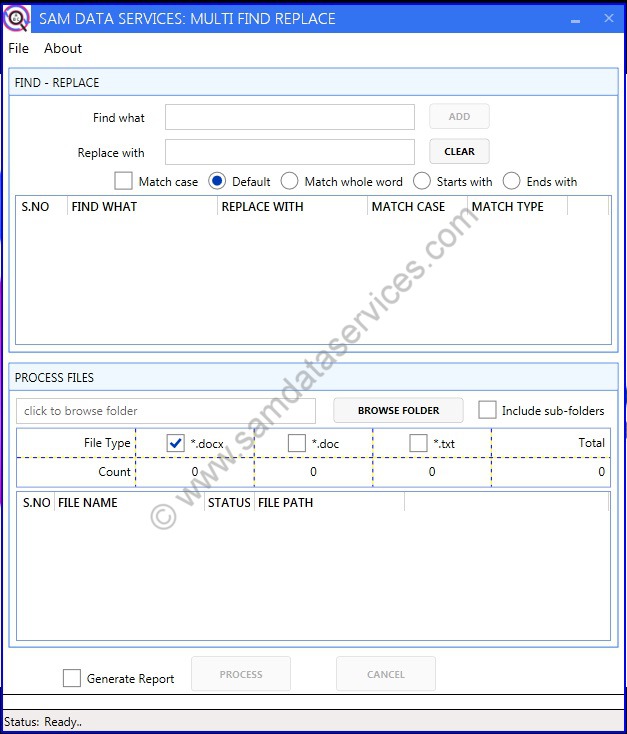
Achieving 100% accuracy is a major challenge in data entry and proofreading workflows. After OCR/ICR conversion, many common typos appear repeatedly across large sets of files.
Manually correcting each file takes too much time. Multi Find Replace lets you perform multiple replacements on multiple files in one shot, helping reduce effort and improve accuracy.
Performs multiple find-and-replace operations on batch files efficiently.
Works with MS Word (*.docx, *.doc) and Notepad (*.txt) files.
Intuitive and easy-to-use interface for all users.
Processes files within subfolders automatically.
Saves templates to reuse find-and-replace listings for future tasks.
Provides detailed reports of replacements done in each file.
Reduces proofreading effort and enhances accuracy in less time.
No monthly subscriptions—pay per installation with lifetime access and support that matches your plan.
Explore the full interface with a sensible limit before you license batch mode.
Lifetime license per PC—unlimited batch processing with upgrades and full support.
Best value when you deploy across five or more machines—premium support included.
Multi Find Replace is an advanced automation utility designed to perform bulk search and replace actions on collections of target words across multiple batch files simultaneously in one single shot.
Manual proofreading and bug correction across numerous documents takes significant time and introduces human error. Multi Find Replace handles the heavy lifting instantly, eliminating repetitive file switching and keeping your validation workflows completely frictionless.
To ensure clean data filtering, the software supports context-aware conditional updates. You can execute full-word matches, "starts with" filters, "ends with" rules, and toggle strict case-sensitive formatting.
OCR and ICR software frequently create uniform typos across scanned text. Instead of opening each document to correct identical system mistakes, this tool sweeps through your entire file batch to fix recurring conversion bugs instantly.
Our Image Super-Imposing Software features a basic, single find-and-replace command per batch. Multi Find Replace is a specialized power upgrade, allowing you to run an unlimited list of diverse search rules on multiple files at the exact same moment.
Yes, you can download a free evaluation version to test out the software parameters. To process unlimited batches, remove text boundaries, and access priority updates, you can easily upgrade to a full professional license.
You can purchase a license key online. Simply run the software setup framework, generate your hardware request parameters, and submit your activation details directly on our website to receive your license file.
For Indian users, payments can be made via UPI, QR Code, Bank Transfer, or online through Razorpay. International users can seamlessly utilize PayPal for secure global transactions.
Download now and automate repetitive text corrections across DOC, DOCX and TXT files.
Have a question or need a custom quote? We are available 24*7. contact us: info@samdataservices.com. Need assistance? Contact us on WhatsApp.

 for excellence.