Save Time on Repetitive Work
Automate repetitive typing tasks and reduce the time spent manually entering the same or large amounts of text.

Focus Auto Typer Pro is automatic typing software designed to automate repetitive typing and data-entry tasks. It simulates keyboard keystrokes to transfer prepared text to third-party Windows applications, including applications where copy and paste is disabled.
Focus Auto Typer Pro helps reduce repetitive manual typing by entering prepared text through keyboard keystrokes. Use it for data entry, text transfer and other repetitive typing workflows.
Automate repetitive typing tasks and reduce the time spent manually entering the same or large amounts of text.
Simulate keyboard typing to transfer prepared text to compatible third-party applications.
Adjust the typing speed dynamically and use random typing speed when you want variation during automated typing.
About Focus Auto Typer
Focus Auto Typer Pro is Windows automatic typing software for repetitive typing and data-entry work. It can load text from supported files or accept text through copy and paste, then enter the text into a third-party application using simulated keyboard keystrokes.
Features
A practical set of typing automation features for repetitive text entry, data-entry and keyboard-based workflows.
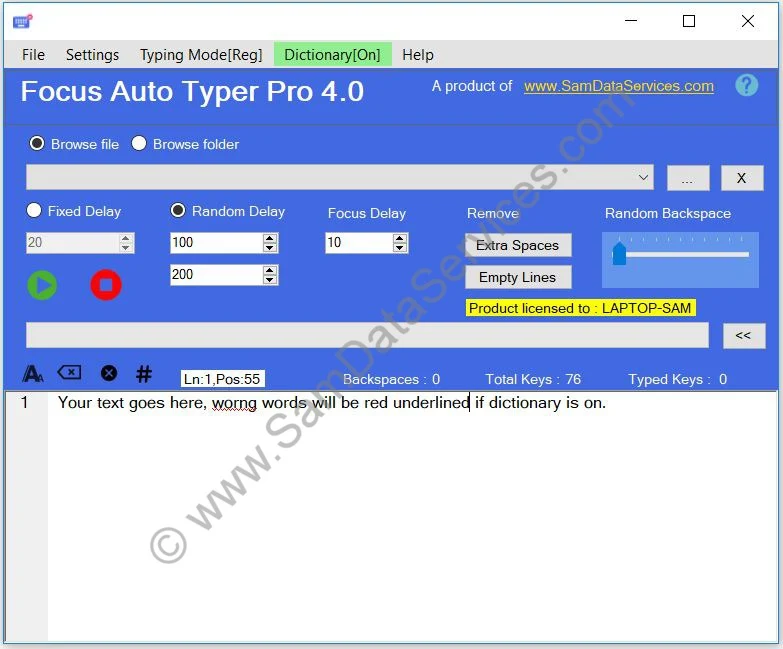
Load text into Focus Auto Typer by browsing for files, dragging supported files into the software, or copying and pasting text.
Load text from commonly used document and web formats.
Adjust typing speed dynamically while the software is typing and use random typing speed for variable typing.
Control the automated typing process with play, pause and resume actions.
Add random backspaces or insert custom backspaces when required during automated typing.
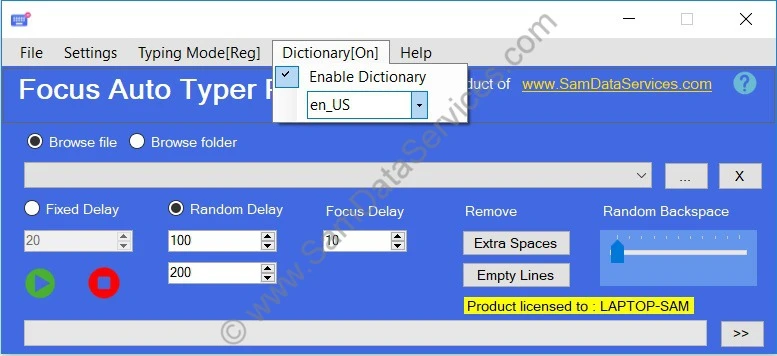
Enable the dictionary feature to identify words that are not found in the selected dictionary.
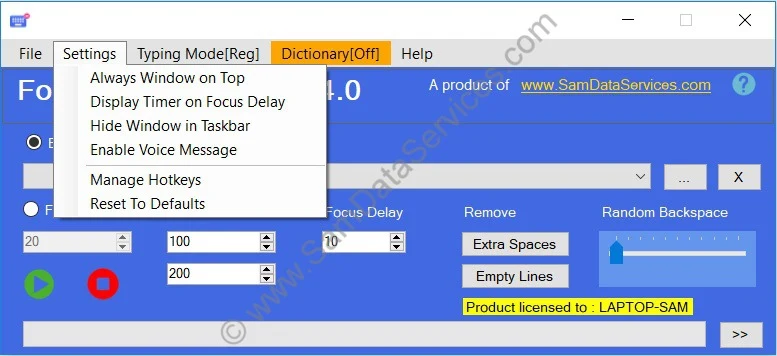
Customize keyboard shortcuts for controlling play, pause and resume actions.
Keep Focus Auto Typer accessible while working with other applications.
Clean loaded text before starting the automated typing process.
Additional options help you configure Focus Auto Typer for your preferred workflow.
Load your text, configure the typing options and start automated keyboard typing.
Browse for a supported file, drag and drop a file, or copy and paste text into Focus Auto Typer.
Configure typing speed, random typing speed, backspaces, hotkeys and other available options.
Start the typing process and Focus Auto Typer Pro enters the prepared text through keyboard keystrokes.
Use Cases
Focus Auto Typer Pro can help with repetitive keyboard-based typing and data-entry workflows.
Automate repetitive text entry tasks where prepared information needs to be entered through the keyboard.
Useful for repetitive typing and data-entry workflows in suitable BPO and back-office processes.
Transfer prepared text into compatible third-party applications using keyboard input.
Reduce repetitive manual typing when the same or prepared text needs to be entered multiple times.
Focus Auto Typer Pro v4.0 provides an updated interface and a range of typing automation features for repetitive data-entry and text-entry workflows.
Support: Full support is provided to customers with a valid license. To get a valid license, follow the Focus Auto Typer license guide .
Focus Auto Typer Pro simulates keyboard keystrokes, similar to manual typing. This allows prepared text to be entered into compatible third-party applications through keyboard input rather than relying on copy and paste.
It can also be used with applications where copy and paste is disabled, provided the application accepts keyboard input and automated typing is permitted.
Pricing
Choose the free version to try Focus Auto Typer or purchase a lifetime Pro license for unlimited text and full support.
Perfect for testing basic features.
One-time payment per installation. Full support for valid licenses.
Best value for five or more seats. Premium support.
"Focus Auto Typer Pro has literally halved our data entry time. The human-like typing is incredibly reliable in our proprietary CRM."
"The best investment for my freelance data entry business. One-time payment and it works with every file format I've thrown at it."
"Simple, fast, and does exactly what it says. The import workflow is a game-changer for form filling tasks."
Focus Auto Typer Pro is automatic typing software that simulates keyboard typing to automate repetitive typing and data-entry tasks. It can transfer prepared text to compatible third-party applications, including applications where copy and paste is disabled.
Yes. Focus Auto Typer Lite is available for free with basic functionality. The free version has limitations, while Focus Auto Typer Pro provides the complete feature set, unlimited text and full support for valid licenses.
You can browse for a supported file, drag and drop a supported file, or copy and paste text into Focus Auto Typer.
Focus Auto Typer can extract text from Text (.txt), Word (.doc, .docx), PDF (.pdf) and HTML (.html) files.
No. Focus Auto Typer cannot extract or convert text from image files. It works with supported text-based formats such as TXT, PDF, Word and HTML and does not include OCR for reading text from images.
Yes. Focus Auto Typer Pro simulates keyboard keystrokes rather than relying on the paste command. It can therefore be used with compatible applications where copy and paste is disabled, provided automated keyboard input is permitted.
Focus Auto Typer Pro provides adjustable typing speed controls. You can change the typing speed dynamically, including while typing, and enable Random Typing Speed when you want the speed to vary during automated typing.
Random Typing Speed varies the typing speed during automated typing instead of maintaining one fixed speed. This option is available in Focus Auto Typer Pro.
Enable Dictionary performs spell checking by underlining words that are not found in the selected dictionary. Users can select from the available dictionaries to assist with text accuracy.
Hotkeys allow you to control automatic typing using keyboard shortcuts. You can customize the shortcuts for play, pause and resume actions through the Manage Hotkeys settings.
Random Backspaces can insert backspace keystrokes during automated typing. The feature is designed to reproduce typing corrections as part of the configured typing behavior.
Custom Backspaces allow you to insert backspace actions as required during the typing process.
Yes. You can use Focus Auto Typer Lite for free. The free version has basic limitations, while Focus Auto Typer Pro provides advanced options such as Random Typing Speed, Random Backspaces, Custom Hotkeys and other features.
Focus Auto Typer Lite is available for free with basic limitations. Focus Auto Typer Pro provides the complete feature set, including unlimited text, advanced typing controls and full support for valid licenses.
Purchase a Focus Auto Typer Pro license and follow the license instructions provided by Sam Data Services. You can also refer to the Focus Auto Typer License File / Key guide .
For Indian users, payments can be made through UPI, QR Code, Bank Transfer or Razorpay on our website. International users can use PayPal. You can find the available payment options here .
Join thousands of professionals who have already reclaimed their time with Focus Auto Typer Pro.
Need help? Contact us anytime at info@samdataservices.com

 for excellence.